Kitchen
Dishes and desserts to prepare, then those waiting for the floor. One button at a time: the next step.
Table ordering · Payment · Service screen
Guests order and pay from their phone, with no app to install. Every order lands at the right station — kitchen, bar, floor — and your team always knows what to prepare, what to serve, and to which table.
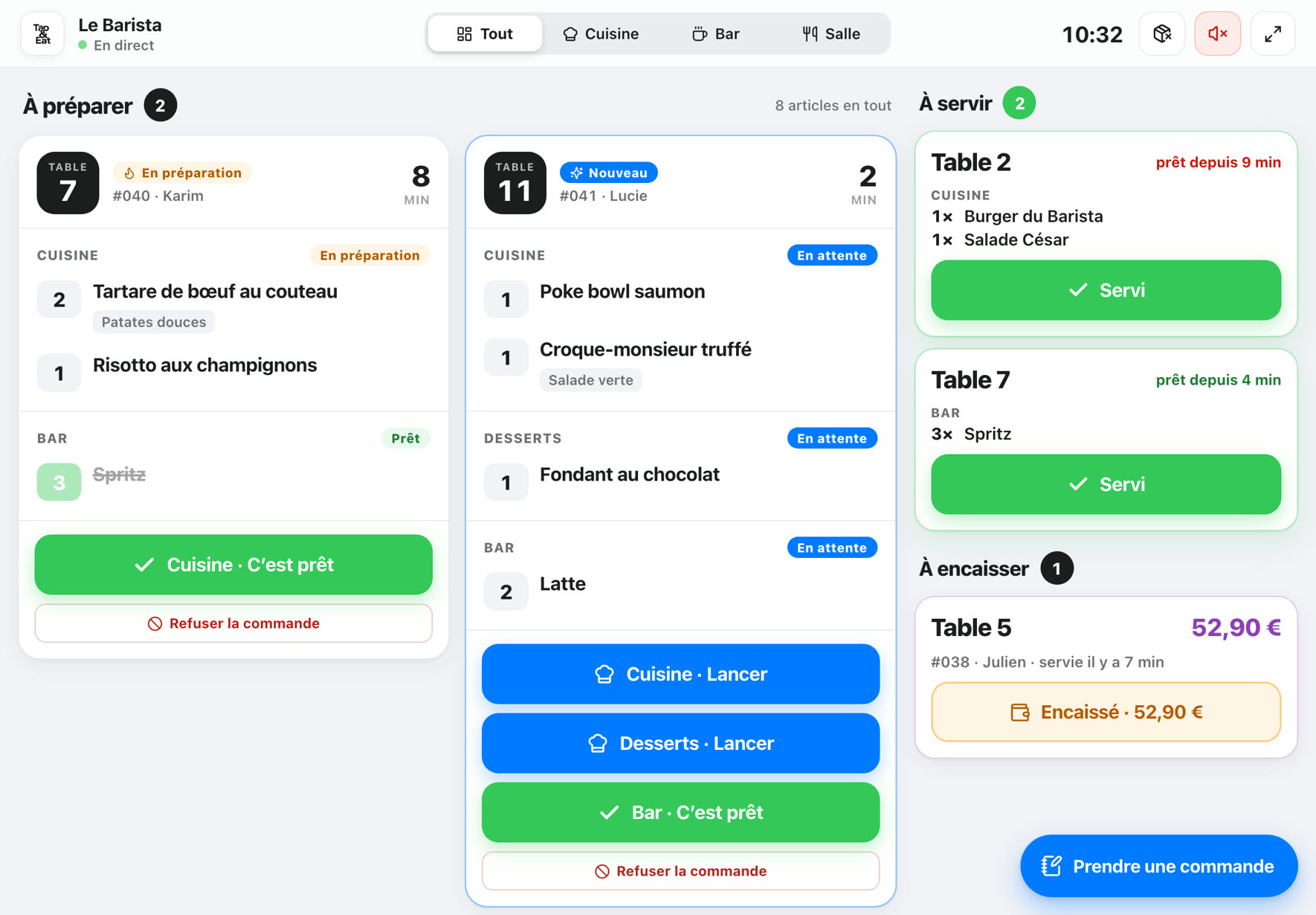
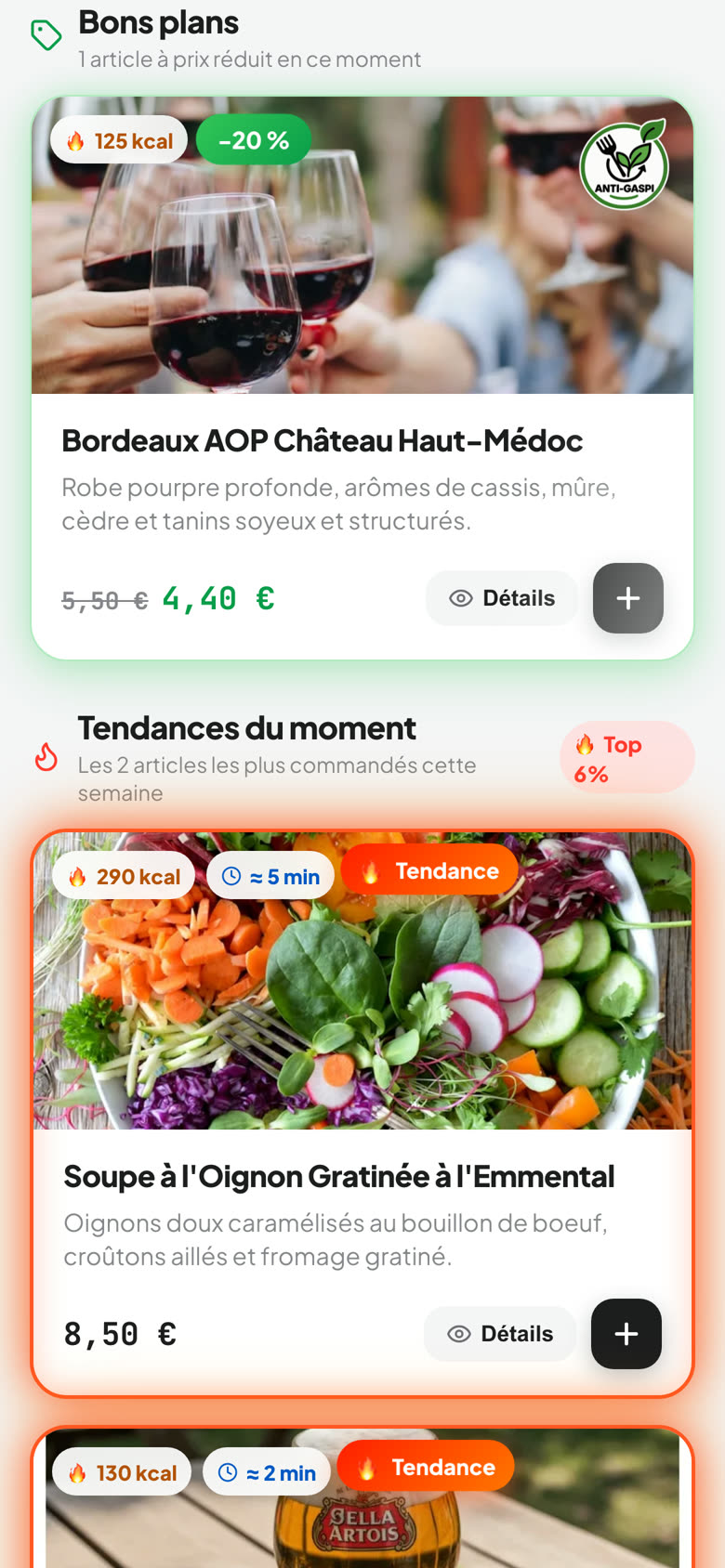
Table ordering · Payment · Service screen
Guests order and pay from their phone, with no app. Every order reaches the right station, and your team knows what to prepare, what to serve, and where.
Try the demo menuHow it works
Here is what actually happens when a guest orders with Tap&Eat — from their table to the kitchen, and from the kitchen back to their table.
Your menu opens in their phone’s browser. No app to download, no account required.
Live demo
This phone runs the real app — table 1 at Le Barista, our demo venue. Browse the menu, open a dish, build a basket.
Point your iPhone or Android camera at this code: it is exactly what a seated guest sees.
Service screen
This is not a video: it is the software your team uses, running on a simulated service. Guest orders arrive on their own. Your turn.
At the top of the tablet, switch between “Kitchen”, “Bar” and “All”: that is the station picker, just like in your venue.
Every employee has an account. Their station decides what they see — and one person can cover several stations.
Dishes and desserts to prepare, then those waiting for the floor. One button at a time: the next step.
Drinks, confirmed in a single tap. They are served as soon as they are ready, without waiting for food.
The floor plan, what is ready to bring out and what is left to collect. No preparation buttons: no mistakes possible.
All production and all service on one screen. A station they are not watching blinks when something is waiting.
Tablet, computer, phone, and the Tap&Eat Pro app: the same screen everywhere, synced in real time.
Automatic stock
Link each dish to its recipe card, once. From then on, every order takes its own ingredients out of stock: no more counting at night, no more running out mid-service.
For each dish, its ingredients and quantities. Options count too: “fries” adds 180 g of potatoes, “double” doubles the recipe.
Ingredients are set aside as soon as the order is confirmed, then taken out of stock when the kitchen taps “Ready”. A cancelled order gives its ingredients back on its own.
One threshold per item, and the “to order” list fills itself. Stock value and this week’s food cost are on your overview.
How it works
Swipe to follow an order →
1 The guest
Your menu opens in their phone’s browser. No app to download, no account required.
2 Payment
Online with Apple Pay, Google Pay or card — into YOUR SumUp account or your bank (Crédit Agricole, Crédit Mutuel, CIC, Banque Populaire, Caisse d’Épargne…): the money goes to you, Tap&Eat never touches it. Or at the table, if you enable it.
3 Production
Dishes and desserts go to the kitchen, drinks to the bar. Each station only sees what it prepares, with a chime on arrival.
4 The floor
Their phone shows what is ready and for which table: the floor plan lights up green. Tap&Eat waits until the whole table is ready before calling the dishes — drinks go out straight away.
5 Management
Paid online: done. Paid on site: the server confirms “Paid”. Every sale goes into a secure ledger, with daily closings and an export for your accountant.
Live demo
Open the demo menu as if you were seated at table 1 at Le Barista. It is the real app, the one your guests use.
Service screen
Every station has its own screen, on a tablet or a phone. These are the real screens, as your team will see them mid-service.
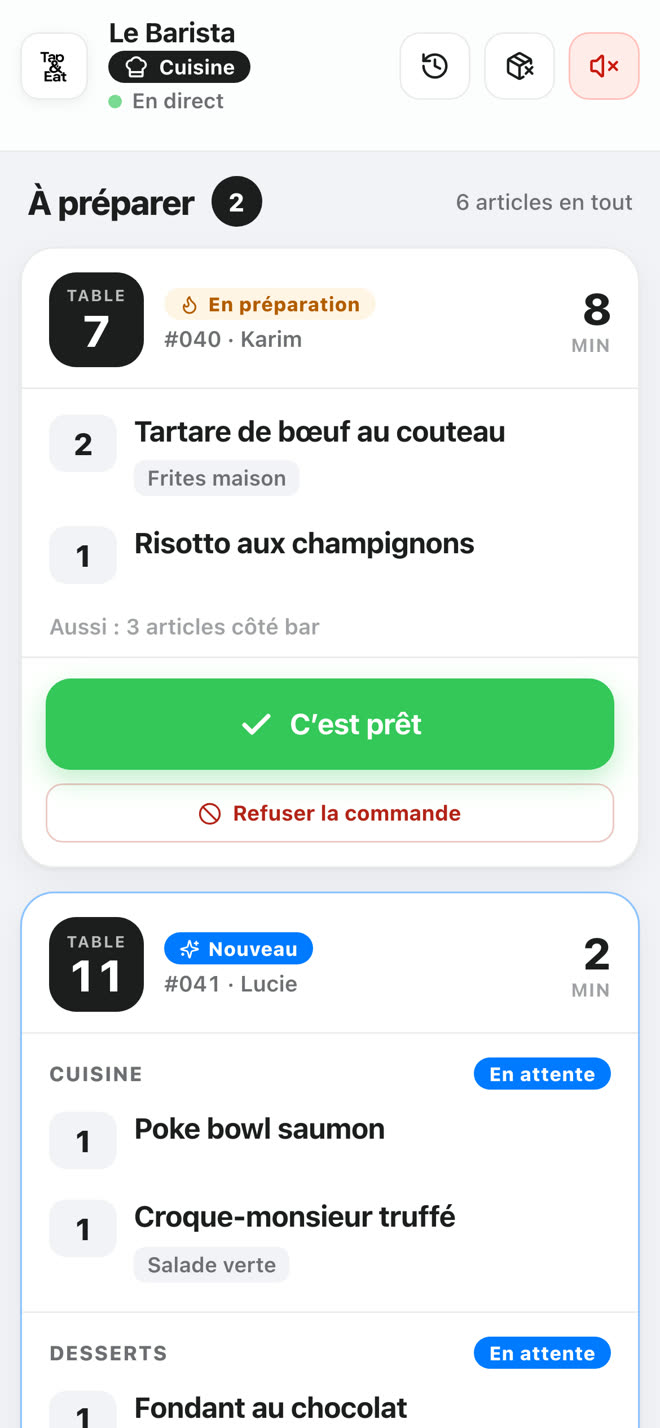
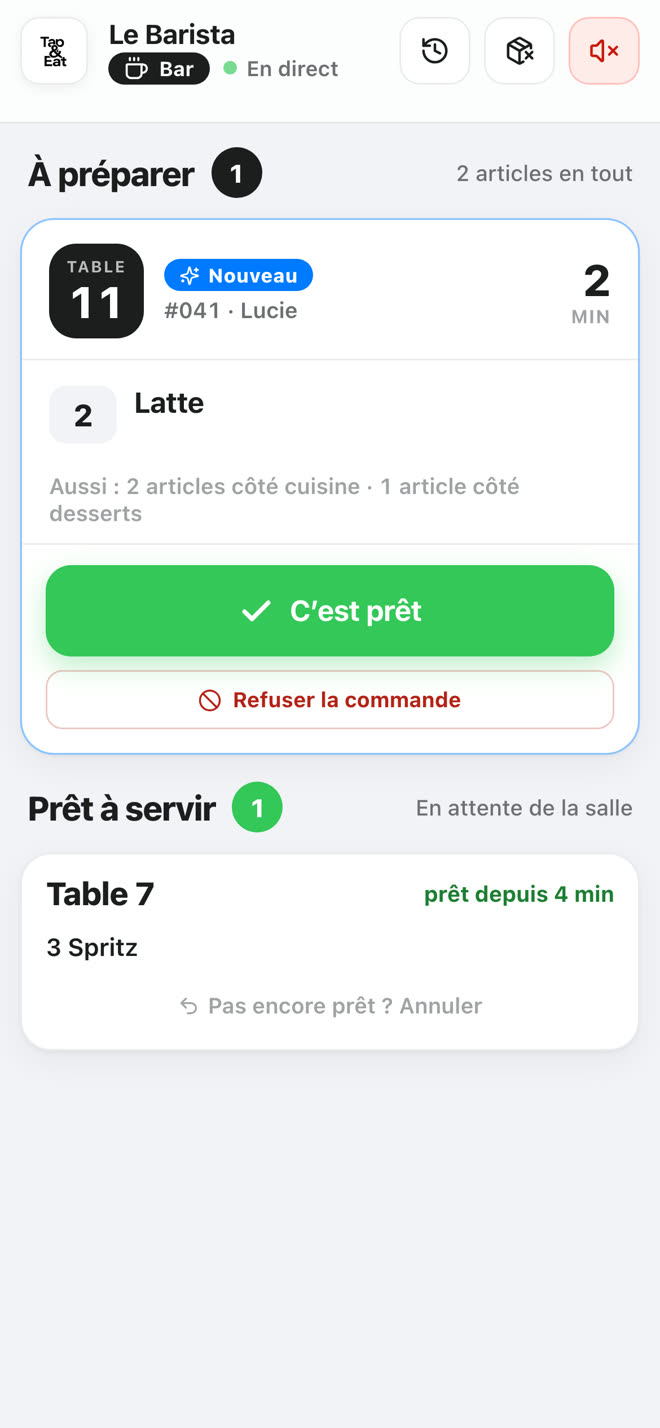
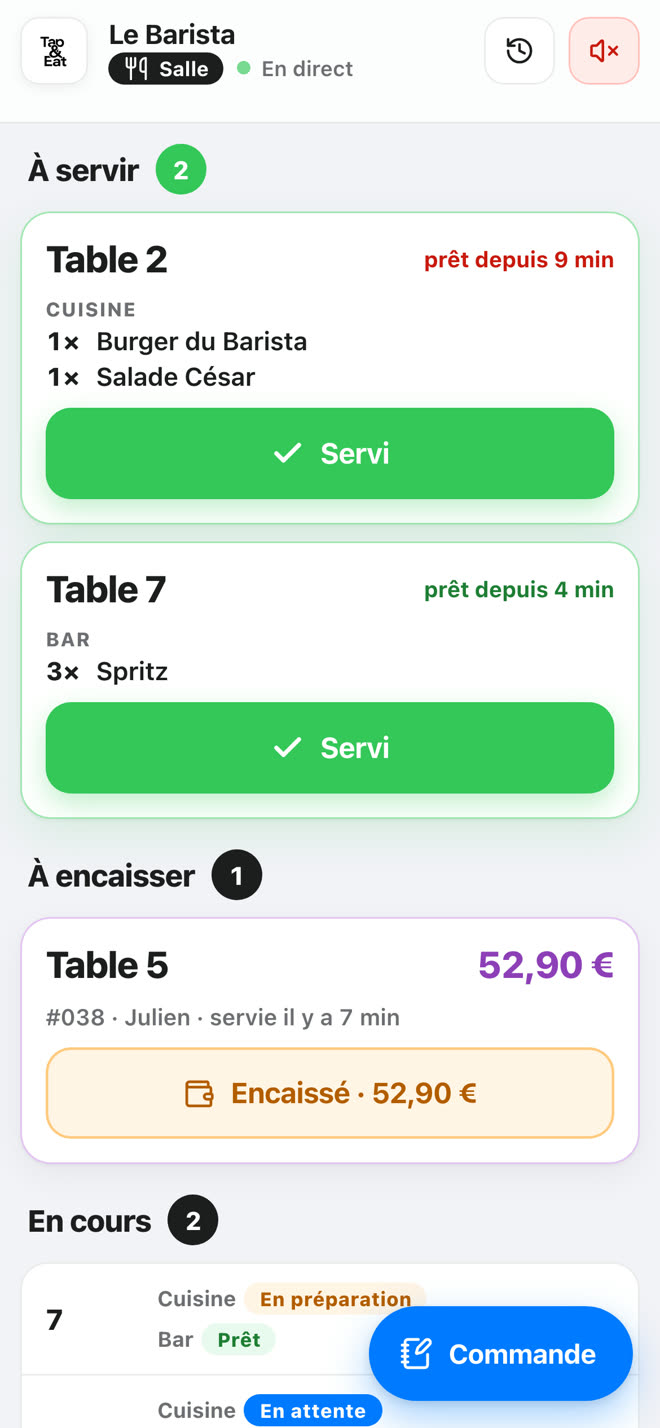
All production and all service on one screen. A station they are not watching blinks when something is waiting.
On a computer, try the service screen live, on a simulated service.
Automatic stock
Link each dish to its recipe card, once. From then on, every order takes its own ingredients out of stock: no more counting at night, no more running out mid-service.
For each dish, its ingredients and quantities. Options count too: “fries” adds 180 g of potatoes, “double” doubles the recipe.
Ingredients are set aside as soon as the order is confirmed, then taken out of stock when the kitchen taps “Ready”. A cancelled order gives its ingredients back on its own.
One threshold per item, and the “to order” list fills itself. Stock value and this week’s food cost are on your overview.
These automations are optional: switch on the ones that suit you.
Included in every plan, at no extra cost.
Video
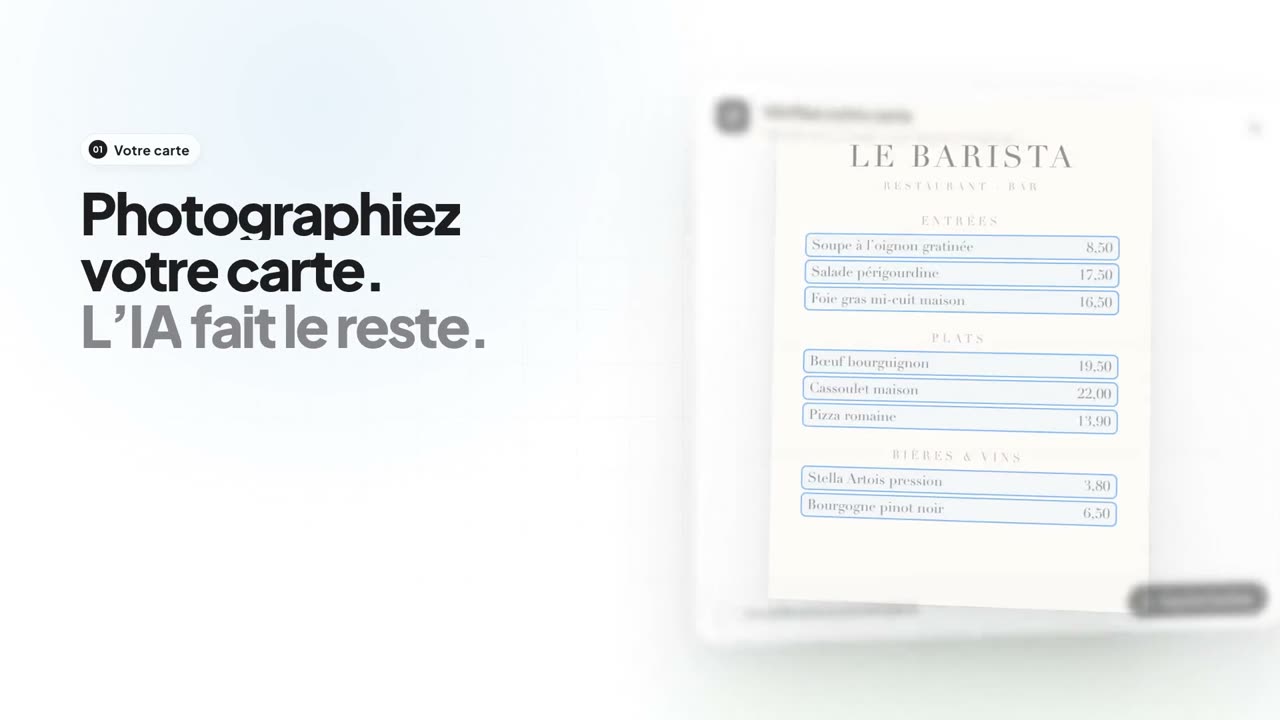
From a photographed menu to the first service: the whole journey in sixty seconds.
Features
Every feature is included in every plan. Only the number of tables changes between plans.
Take a photo of your menu: AI reads the dishes, prices and categories. It suggests, you approve — nothing is saved without your review, and suggested allergens are never applied automatically.
Dishes, drinks, cocktails, desserts: with photo and description, added in one tap, then adjusted.
Draw your areas and tables. Servers see the same plan on their screen, in colour.
One account per employee, one or more stations each: kitchen, bar, floor.
From the kitchen, a sold-out dish instantly disappears from every guest’s menu.
Scheduled discounts on items, at set times, applied automatically.
Points with every order, and anonymous reviews left after the meal.
Sales, items, and the time spent at each step — per dish, compared with its station.
Tamper-proof sales ledger, daily closings and CSV export for your accountant.
No table service? Guests get an email when their order is ready.
International guests read the menu in their language.
Print your QR codes, or order table stands with your logo.
Features
Every feature is included in every plan. Only the number of tables changes between plans.
Take a photo of your menu: AI reads the dishes, prices and categories. It suggests, you approve — nothing is saved without your review, and suggested allergens are never applied automatically.
Dishes, drinks, cocktails, desserts: with photo and description, added in one tap, then adjusted.
Draw your areas and tables. Servers see the same plan on their screen, in colour.
One account per employee, one or more stations each: kitchen, bar, floor.
From the kitchen, a sold-out dish instantly disappears from every guest’s menu.
Getting started
On a computer, in a few minutes. 30-day trial, no commitment.
From a photo with AI, or from the item library.
Draw the plan, print the QR codes or order your table stands.
One account per employee, one station each. A tablet is enough.
ROI calculator
Pick your plan and describe your venue. The result follows the price of the chosen plan, and every assumption can be changed.
Photos, suggestions, ordering without waiting for a server. Keep it cautious.
Indicative estimate based on the assumptions above, which you can change. Additional sales are revenue, not margin; the subscription is shown excluding VAT.
Pricing
Ordering, payment, service screen, management: everything is included in every plan. Only table capacity changes. No commission on your sales.
Up to 20 tables
For venues with up to 20 tables.
30 days free
then €97 excl. VAT per month, no commitment
Up to 40 tables
The plan for mid-sized venues.
30 days free
then €147 excl. VAT per month, no commitment
Up to 60 tables
For large rooms and extended terraces.
30 days free
then €197 excl. VAT per month, no commitment
Unlimited tables
No table limit, whatever the size of the venue.
30 days free
then €297 excl. VAT per month, no commitment
Every feature is included in all four plans. Only table capacity changes.
Pricing
Ordering, payment, service screen, management: everything is included in every plan. Only table capacity changes. No commission on your sales.
30 days free on every plan, then no commitment. Prices exclude VAT.
FAQ
Payment, service, setup, pricing: the essentials before you start.
With Apple Pay, Google Pay or card, straight from their phone. Payments go through your own SumUp, Crédit Agricole, LCL, Crédit Mutuel, CIC, Banque Populaire or Caisse d’Épargne account, which you connect in your settings: the money lands in your account, Tap&Eat never collects it. You can also offer payment at the table with your usual card machine.
30 days to try it in real conditions. No commitment, no hardware to buy.